

AI for Accountants: Faster Documentation, Safer Numbers
Short answer: AI for accountants delivers reliable value on documentation work: drafting variance narratives from approved figures, writing procedures and checklists, and turning technical updates into plain language for colleagues. Every number in the output is checked against the source, client and company data stays out of unapproved tools, and professional judgment stays with the accountant.
Why accounting work fits AI assistance
AI for accountants fits because accounting runs on recurring documents. Month-end variance notes, procedure manuals, audit request lists, deadline reminders, explanations of the same principles to different colleagues. The numbers demand precision, but a large share of the writing around them is steady, structured and repeatable. That writing is where AI assistance pays off.
At the same time, few professions handle more sensitive information. Client records, payroll, bank details and tax positions pass through an accountant’s hands daily. So the profession that can save the most time on documentation is also the one that needs the strictest habits about what goes into an AI tool.

Where AI for accountants helps most
- Variance narratives from approved figures. Provide the non-sensitive numbers and the context, and get a plain-language first draft of the monthly commentary. You verify every figure against the actual report before it goes anywhere.
- Procedures and checklists. Convert the way your team actually closes the month into written SOPs, handover notes and onboarding material for new staff.
- Plain-language explanations. Turn a technical update into a note that operations or management can act on, without losing the meaning.
- Internal communication. Audit request lists, submission deadline reminders and expense policy updates drafted in clear language.
- Learning and comparison. Getting a general explanation of an unfamiliar treatment or term, always confirmed against official sources or your professional body before you rely on it.
Where it does not help
AI does not carry professional judgment, and it does not know your client’s actual position. Tax treatments, materiality calls and sign-off decisions belong to the accountant. It can also state accounting rules confidently and incorrectly, or quote requirements that have changed. Treat anything it says about standards, tax or regulation as a lead to verify, never as the answer. Our wider guide for HR and finance teams covers the same split: machines draft, people verify and decide.
The rule that protects the practice: check every figure
One wrong figure in a client deliverable can undo a year of trust. So the habit is fixed and non-negotiable: every number, name, date and clause in AI-assisted output is checked against the source document before use, including drafts labelled internal. A practical test for any output is three questions: is it accurate, is it complete for the purpose, and would you sign it. Any no sends it back for human work.
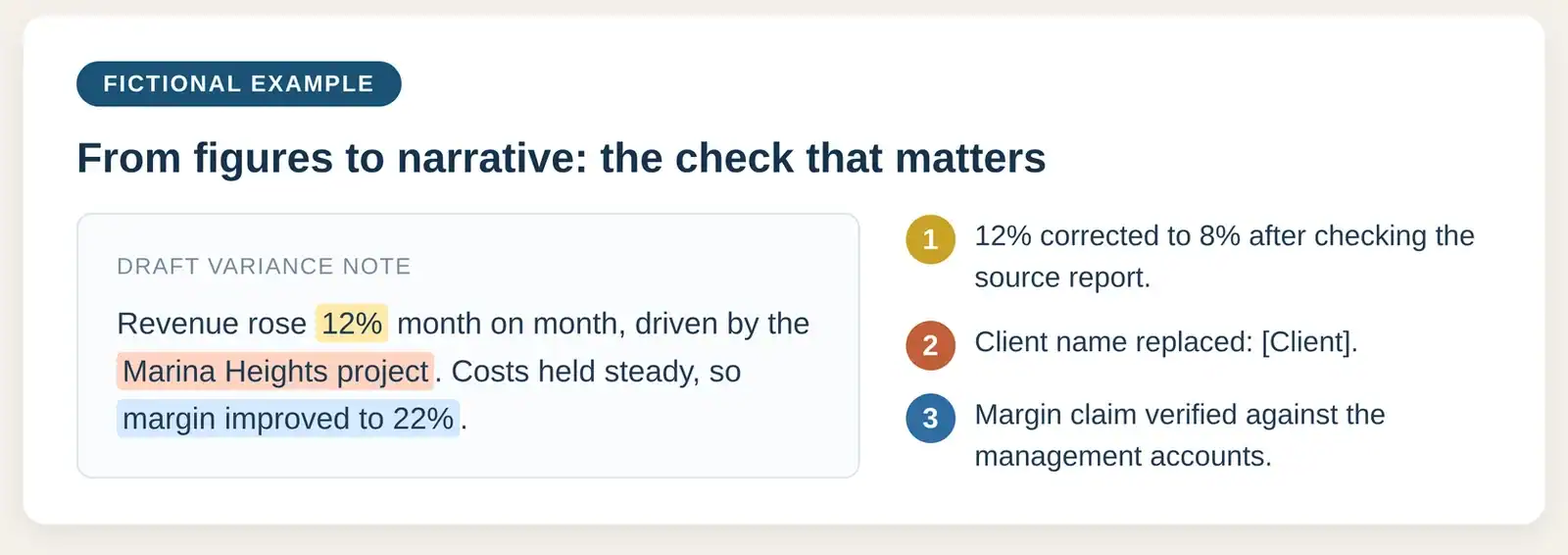
The fictional example below shows the check on a draft variance note: a corrected figure, a replaced client name, a verified margin claim.
Tools worth a look
Five options to consider for the documentation work above: three free assistants for everyday drafting, two paid options for a practice that wants managed accounts.
| Tool | Tier | What it is good for |
|---|---|---|
| ChatGPT | Free | Variance narratives, procedures and plain-language explanations from figures you provide; usage limits apply. |
| Microsoft Copilot | Free | Drafting help in the browser or app, signed in with a Microsoft account; usage limits apply. |
| Google Gemini | Free | Drafting help in the browser or app, signed in with a Google account; usage limits apply. |
| Microsoft 365 Copilot | Paid | Works inside Excel and Word, next to the numbers; needs an eligible Microsoft 365 business subscription. |
| ChatGPT Business | Paid | Managed workspace with admin controls, keeping practice material out of personal accounts. |
Paid plan prices, October 2026 snapshot: Microsoft 365 Copilot Business add-on is US$21 per user per month billed annually (US$18 on promotion, US$25.20 month-to-month). ChatGPT Business is US$25 per user per month, or US$20 billed annually.
Free tiers are personal accounts: fine for public or synthetic material, never for client data. Prices and limits change often, so check the vendors’ pages. Whatever the tool, the rule from earlier applies: client and company data stays out until your practice approves it.
Data safety for accountants
For AI for accountants, the habits in our safe AI use guide apply with extra weight:
- Use only AI workspaces your firm or company has approved. A paid plan on its own does not make a tool safe for client data.
- Removing the client name is not enough. Figures, dates and combinations of small facts can identify a client or an employee even without a name attached.
- Practise on synthetic or anonymised data, never on live client records.
- If something sensitive is shared by mistake, stop sharing immediately, notify your security or privacy contact, and preserve the details of what was shared. Delete anything only on the instruction of the team authorised to handle it.
Malaysia’s Personal Data Protection Act may apply to much of this data, and amendments have raised the stakes. This article is general information, not legal advice; check your obligations with your privacy officer or legal adviser.

Rolling it out in a finance team or small practice
- Pick one document type, for example the monthly variance commentary.
- Agree in writing what may and may not go into a prompt.
- Practise for two weeks on synthetic or historical material.
- Review output quality together weekly: accuracy, completeness, time saved.
- Expand only when the checking habit is consistent across the team.
Common mistakes to avoid
- Trusting fluent output. A well-written paragraph about your EPF, SOCSO or tax obligations can still be wrong. Fluency is not accuracy.
- Pasting a real ledger “just this once”. One client spreadsheet in an unapproved tool is a confidentiality incident, not a shortcut. If it happens, follow the incident steps above rather than quietly deleting the chat.
- Skipping the review because the first result looked good. The check takes minutes. Rebuilding client trust takes much longer.
- Letting each person experiment privately. Unguided use produces inconsistent quality and invisible risk. A short shared guide and one approved workspace beat ten private experiments.
What good looks like after three months
Rolled out steadily, AI for accountants shows a predictable picture: month-end narratives take less time to draft, procedures are actually written down, and the checking habit spreads to work that never touches AI. The gains come from the habits, not the tool brand. That is why effective training focuses on evaluation and workflow rather than button-clicking: tools change every few months, but the ability to judge output stays valuable.
Measuring whether it is working
Judge AI for accountants by outcomes: turnaround time for the chosen document, errors caught in review, and whether staff still verify figures as carefully as before. If the verification habit slips, the time savings do not count. Review monthly for the first quarter, and stop any use case that looks fast but keeps producing subtle errors. Speed that exports mistakes to clients or regulators is not a saving.
Frequently asked questions
Can AI write our month-end commentary? It can draft the narrative from figures you provide and approve, and you verify every number before the commentary is used. The analysis and the conclusions remain yours.
Is client data ever safe in an AI tool? Only inside a company-approved workspace, and only when the task genuinely needs it. When in doubt, describe the structure and use sample rows instead of real records.
What about AI features inside our accounting software? Features built into software your firm already controls keep data inside a system you govern, a safer start than a separate chat tool. Your vendor’s terms still need a read.
Will this replace junior accountants? In practice it removes drafting and formatting time. Verification, judgment and accountability stay with the team, and those are the parts clients pay for.
The bottom line
AI for accountants pays off when the split is clear: machines draft and summarise, people verify and decide. Protect client data, check every figure, and expand one document type at a time. The firms that gain the most are the ones that treat the checking habit as part of the work, not an extra.
Want your finance team trained on practical, safe AI workflows? Mike is an HRDC-certified trainer running corporate AI sessions on AI for workplace productivity across Malaysia, including a track for finance and admin teams; ask him about HRDC claimability for your arrangement.


