

AI for Managers: Leading Teams That Use AI Well
Short answer: AI for managers works best when it drafts and summarises while people decide. Set one approved workspace, write down what may and may not be pasted into it, start with one recurring document, and review output quality together every week. Judgment stays with the manager on decisions, figures and anything touching people.
Your team is already using AI
Most managers did not roll out AI. It arrived anyway. Someone on the team drafts emails with it, another person summarises meeting notes, a third asks it to tidy a report before Friday. Some of that happens in approved tools, some in personal accounts nobody talked about.
This puts the manager in a new position. You do not need to become the most technical person in the room. You do need to set the norms: what gets used, what never goes into it, and what “checked” means before AI-assisted work leaves the team. Teams that set these norms early gain time every week. Teams that do not get invisible risk and uneven quality, and they usually find out late.

Where AI for managers helps the working week
- Drafting routine updates. Weekly reports, project status notes and team announcements start as structured drafts from your bullet points. You adjust tone and facts before anything goes out.
- Summarising long documents. A 40-page proposal or a long email thread becomes a one-page brief you can actually read before the meeting. You still open the original for anything that matters.
- Meeting preparation and follow-up. Agendas, question lists and first-draft minutes come together faster, and the follow-up email gets its first version while the discussion is still fresh.
- First drafts of plans and documents. Onboarding guides, process notes and internal FAQs start from your outline instead of a blank page.
In each case the pattern is the same: the tool produces a draft quickly, and a person makes it correct. The saving is real, but it lives in the drafting stage, not in the thinking stage.
What stays with the manager
AI output reads confidently even when it is wrong, and it has no stake in the outcome. That is why certain calls stay with you:
- Decisions and commitments. Anything the business will be held to, budgets, deadlines, promises to clients, is decided by people and checked by people.
- People matters. Performance comments, appraisal wording and anything disciplinary are written and owned by you. A tool can help you structure your thoughts, but the judgment and the accountability are yours.
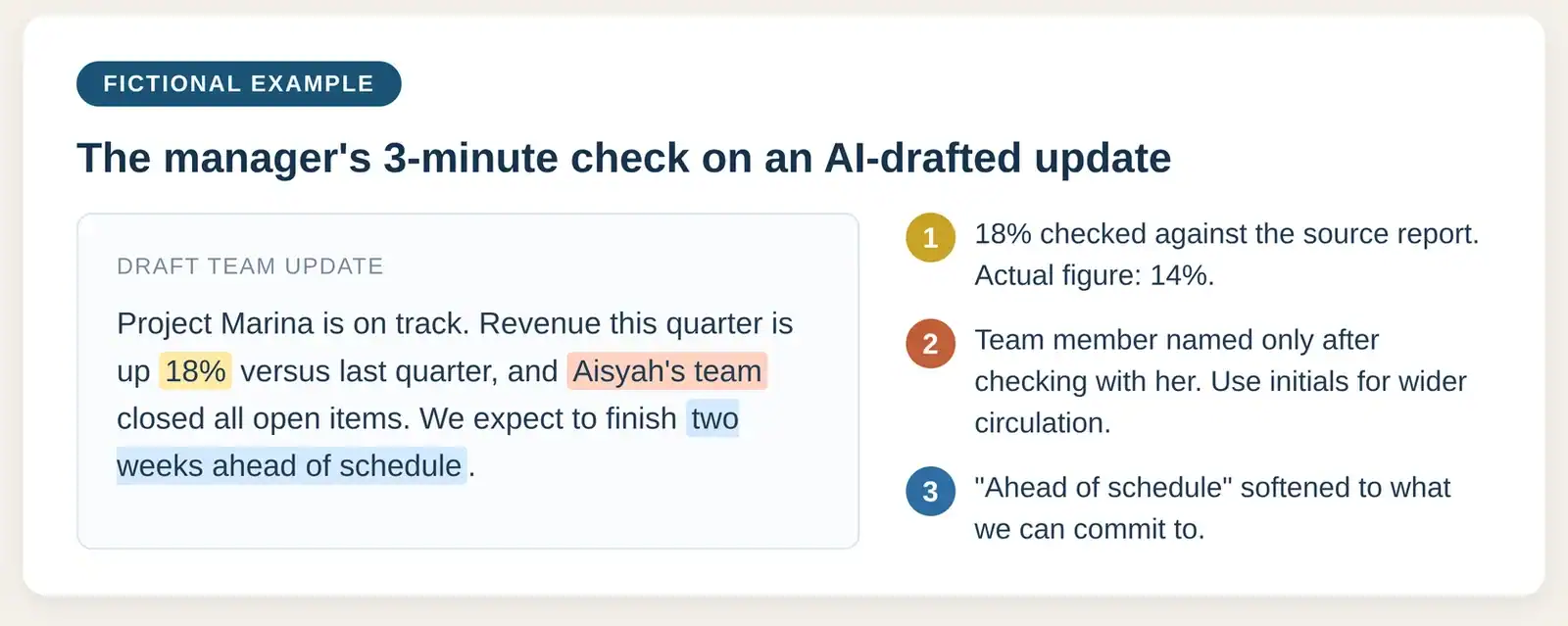
- Every figure and name. Before AI-assisted work leaves your desk, every number, name, date and quote is checked against the source. This is the habit that separates teams gaining time from teams exporting mistakes.
The fictional example below shows what this check looks like on a routine team update: one figure corrected, one name handled with care, one claim softened.
Set the rules before the tools
The habits in our safe AI use guide are the foundation. AI for managers succeeds or fails on three written decisions for your team:
- Which workspace is approved. One company-approved account setup, not ten personal ones. A paid plan on its own does not make a tool safe, but an approved workspace keeps company data under company control.
- What may be pasted. Drafts, public material and synthetic examples are usually fine. Client data, staff records, salary figures and unreleased numbers are not, until your company says otherwise in writing.
- What “checked” means. Name who verifies the output before it is used, and against which source. If the answer is “everyone checks their own”, write down what that check includes.

Tools worth a look
Five options to consider: three free assistants for everyday drafting, two paid options for when a whole team comes on board.
| Tool | Tier | What it is good for |
|---|---|---|
| ChatGPT | Free | Everyday drafting and summarising; usage limits apply. |
| Microsoft Copilot | Free | Drafting and summarising in the browser or app, signed in with a Microsoft account; usage limits apply. |
| Google Gemini | Free | Drafting and summarising in the browser or app, signed in with a Google account; usage limits apply. |
| Microsoft 365 Copilot | Paid | Works inside Word, Excel, Outlook and Teams; needs an eligible Microsoft 365 business subscription. |
| ChatGPT Business | Paid | Managed workspace with admin controls, so company material stays out of personal accounts. |
Paid plan prices, October 2026 snapshot: Microsoft 365 Copilot Business add-on is US$21 per user per month billed annually (US$18 on promotion, US$25.20 month-to-month). ChatGPT Business is US$25 per user per month, or US$20 billed annually.
Free tiers are personal accounts: fine for public or synthetic material, not for company data until your organisation approves the tool and plan. Prices and limits change often, so check the vendors’ pages before budgeting.
Rolling AI out in your team
A starting sequence that works for most Malaysian SMEs:
- Pick one recurring document, for example the weekly status report.
- Agree the paste rules in writing, in plain language, on one page.
- Practise for two weeks on synthetic or historical material, not live client work.
- Review output together weekly: accurate, complete, worth signing.
- Expand to the next document type only when the habit holds.
Common mistakes managers make with AI
- Assuming no news is good news. If nobody mentions AI, people are using it privately without shared rules.
- Judging the tool by one good result. The first impressive draft says nothing about the tenth. Review quality over weeks, not moments.
- Letting output skip the check because it sounds right. Fluency is not accuracy. The two-minute check is where the value is protected.
- Delegating the awkward writing. If a message would be hard to own, it is the wrong one to hand over.
What good AI for managers looks like after three months
Rolled out steadily, the picture is predictable: routine updates take less time, documents become more consistent across the team, and the checking habit spreads to work that never touches AI. New team members inherit the rules instead of guessing. That is the real promise of AI for managers: steadier weeks, not flashier tools. The gains come from the habits, not the tool brand, which is why effective training focuses on evaluation and workflow rather than button-clicking.
Measuring whether it is working
Judge AI for managers by outcomes, not activity. Three measures cover most of it: turnaround time for the chosen document, errors caught in review, and whether your team still verifies figures as carefully as before. If the third slips, the first two do not count. Review monthly for the first quarter, and be willing to retire a use case that looks fast but keeps producing subtle errors.
Frequently asked questions
Should I ban AI until we have a policy? A blanket ban usually drives use underground, where you cannot see it. A short written rule and one approved workspace give you visibility faster than a ban does.
Can AI write my team updates? It can draft them from your bullet points, and you stay responsible for the facts and the tone. Your team will hear the difference between your judgment and a generic draft.
Is it safe for performance reviews? Treat appraisal wording as people matters: your judgment, your words, your accountability. A tool may help you organise feedback themes, but never paste identifiable staff information into an unapproved tool.
How technical do I need to get? Working knowledge of what these tools can and cannot do is enough. Your real skill as a manager is judging output quality and setting team norms, and both improve with use.
The bottom line
AI for managers is not about mastering features. They need to set three things: one approved workspace, clear paste rules, and a review habit where every figure and name gets checked. With those in place, the team gains hours a week on drafting and summarising, and the judgment stays where it belongs.
Want your managers trained to lead practical, safe AI use? Mike is an HRDC-certified trainer running corporate AI sessions on AI for workplace productivity across Malaysia, including a dedicated track for leaders and managers; ask him about HRDC claimability for your arrangement.


