

AI Presentation Maker at Work: From Brief to a Deck Your Team Can Trust
Short answer: An AI presentation maker earns its keep on structure and first drafts: outlines, slide headlines, speaker notes and consistent layouts. The brief you give it decides most of the quality, and every figure, name and claim still needs a human check before the deck reaches management or a client.
Why decks eat the working week
Most Malaysian offices run on slides. Weekly updates, sales proposals, project reviews, training material, board papers. The content is usually known by the person making the deck. What consumes the hours is turning that knowledge into a structured, presentable set of slides: deciding the order, writing headlines, formatting, trimming, reformatting.
That is exactly the profile where an AI presentation maker helps. Not the thinking, which is yours, but the conversion of thinking into a first working draft you can react to.
What an AI presentation maker does well
- Structure from a brief. Give it the audience, the purpose and your key points, and it proposes an outline with a slide-by-slide flow. You keep, reorder or cut from there.
- Slide headlines and body drafts. First versions of titles and supporting points arrive in seconds. Expect to rewrite some, and expect the rewrite to be faster than starting from a blank slide.
- Speaker notes. A useful draft of what to say per slide, which you then make your own.
- Repurposing documents. A report or proposal can be condensed into a deck draft, which is where recurring monthly decks save the most time.
- Visual consistency. Layouts and styling stay uniform across slides, which lifts the whole deck’s finish without a designer.

The brief decides the deck
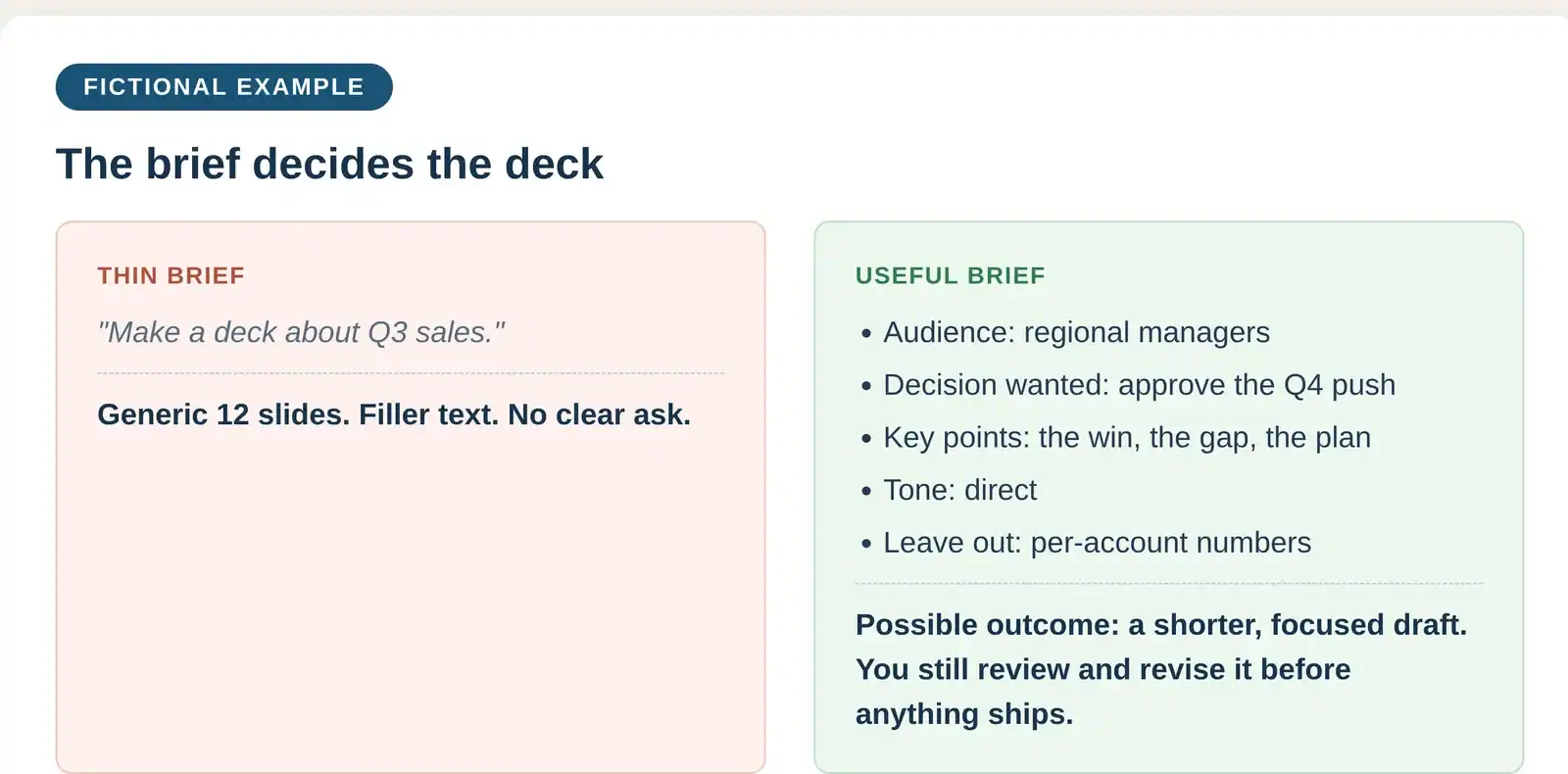
Two people can use the same AI presentation maker and get very different decks. The difference is almost never the tool. It is the input. A thin brief (“make a deck about Q3 sales”) produces a generic deck full of filler. A useful brief names the audience, the decision you want from them, the three to five points that matter, the tone, and what to leave out.
The fictional example graphic below shows the contrast: the same topic, one thin brief and one useful brief, and the kind of first draft each produces. The useful brief takes ten minutes to write and saves a round or two of rework.
What it cannot decide for you
- Your numbers. The tool does not know your actual figures. Every number on every slide comes from your source data and gets checked against it.
- Your story. Which point leads, what gets cut, where the emphasis sits for this particular audience. That is judgment, and it stays with you.
- Your claims. A confident slide can still overstate. Anything a client or regulator could hold you to gets a careful read before the deck goes out.

Check the deck before it leaves your desk
Adopt one fixed habit for AI-assisted decks: every figure, name, date and claim is verified against the source, and one named person owns that check. It takes minutes per deck. The alternative, a wrong figure in front of a client or a board, costs far more than the time the tool saved.
It also helps to read the deck aloud once as the presenter. Draft headlines that look fine on screen sometimes say something you would never claim in the room.
Tools worth a look
Five AI presentation maker options to consider: three free assistants for outlines, headlines and speaker notes, two paid options that work closer to where the deck is built.
| Tool | Tier | What it is good for |
|---|---|---|
| ChatGPT | Free | Outlines, slide headlines and speaker notes from your brief; usage limits apply. |
| Microsoft Copilot | Free | Drafting help in the browser or app, signed in with a Microsoft account; usage limits apply. |
| Google Gemini | Free | Drafting help in the browser or app, signed in with a Google account; usage limits apply. |
| Microsoft 365 Copilot | Paid | Helps draft slides inside PowerPoint itself; needs an eligible Microsoft 365 business subscription. |
| Gamma | Paid | Designed first decks from your brief. Free test tier up to 10 slides per prompt; Plus up to 100 slides per prompt, no Gamma branding. Prices on its pricing page. |
Paid plan prices, October 2026 snapshot: Microsoft 365 Copilot Business add-on is US$21 per user per month billed annually (US$18 on promotion, US$25.20 month-to-month). Gamma lists current plan prices on its pricing page.
Free tiers are personal accounts: fine for public or synthetic material, not for confidential deck content until your company approves the tool and plan. Prices and limits change often, so check current vendor pages.
Data safety for presentation work
Decks concentrate sensitive material: sales figures, client names, project margins, staff performance. The habits in our safe AI use guide apply directly:
- Use only the AI workspace your company has approved. A paid plan on its own does not make a tool safe.
- Describe structure and use sample figures when drafting. Paste real client names and confidential numbers only into an approved setup, and only when the task truly needs them.
- Remember the deck travels. Slides get forwarded. Anything on a slide should be safe to read by a wider audience than the room.
Malaysia’s Personal Data Protection Act may apply where personal data is involved. This article is general information, not legal advice; check your obligations with your privacy officer or legal adviser.
Rolling it out across a team
- Pick one recurring deck, for example the monthly performance update.
- Agree what may and may not go into the tool, in writing.
- Write one shared brief template: audience, decision wanted, key points, tone, exclusions.
- Review the first few decks together, checking figures and claims as a team.
- Expand to proposals and client decks once the checking habit holds.
Common mistakes with AI-made decks
- Sending the first draft. The first draft is a starting point. Unedited decks read as generic, and clients can tell.
- Pasting confidential data for convenience. One client P&L pasted into an unapproved tool is a data incident, not a shortcut.
- Letting the tool choose the story. If the deck’s argument came from the tool rather than from you, the room will feel it.
- Skipping the read-aloud. Presenting words you have not said out loud is how surprises happen on slide four.
Measuring whether it is worth it
Three measures tell the story of whether an AI presentation maker is paying off: time from brief to finished deck, number of revision rounds before approval, and errors caught in the figure check. A healthy rollout cuts the first two while the third stays small. If decks get faster but errors creep up, slow the rollout down and fix the checking habit first.
Frequently asked questions
Will our decks look generic? They will if the brief is thin. With a proper brief and an editing pass, the deck carries your points and your tone. The tool handles structure and finish, not your message.
Can it follow our company template? Most setups can work within your brand colours and layouts, though the exact options vary by tool and plan. Check what your company’s approved workspace offers before promising template-perfect output.
Is it safe to paste our sales figures? Only into a company-approved workspace, and only the figures the task needs. When in doubt, draft with sample numbers and swap the real ones in afterwards inside your own files.
Does this replace a designer? For routine internal decks, it covers most of the finish a team needs. For high-stakes pitches and brand-critical material, a designer’s judgment still earns its fee.
The bottom line
An AI presentation maker is a drafting partner, not a deck department. Give it a real brief, check every figure and claim, keep confidential data inside approved tools, and your team gets hours back every week without the quality dropping.
Want your team producing better decks and reports with AI, safely? Mike is an HRDC-certified trainer running corporate AI sessions on AI for workplace productivity across Malaysia, including a dedicated track for reporting and presentations; ask him about HRDC claimability for your arrangement.


