

AI Email Writing at Work: Faster Replies, Proposals and Customer Follow-ups
Short answer: AI email writing is most useful for structure, first drafts and tone, not for judgment. Let it draft the routine parts of replies, proposals and follow-ups, then you check facts, names and promises before anything is sent. Client details stay out of the prompt unless your company has approved the tool and the content. Done this way, most teams write faster without sounding like a machine.
Why email is the right place to start with AI
Email is where most office hours go. A widely cited McKinsey Global Institute study (The social economy, 2012) estimates the average interaction worker spends 28 percent of the workweek managing email, and in Malaysia that includes proposals, quotations, follow-ups and customer replies in both English and Bahasa Melayu.
Email is also repetitive. The structure of a follow-up, a quotation cover note or a meeting confirmation barely changes. That makes it the safest and most rewarding place to build AI habits before touching harder work like contracts or analysis.

Where AI email writing helps day to day
Used well, an AI assistant helps with four kinds of email work:
- First drafts. Give it the situation in two or three sentences and ask for a draft. You still rewrite, but you start from something instead of a blank screen.
- Tone adjustment. Ask for a firmer, warmer or shorter version of your own draft. This is useful when a reply needs to be polite but direct, for example a payment reminder.
- Summarising long threads. Paste the parts of a thread you are allowed to share and ask for the key points and open questions. Check the summary against the original before relying on it.
- Alternatives. Ask for two or three subject lines or opening sentences and pick the one that sounds like you.
Where people go wrong
The common mistakes in AI email writing are consistent across teams:
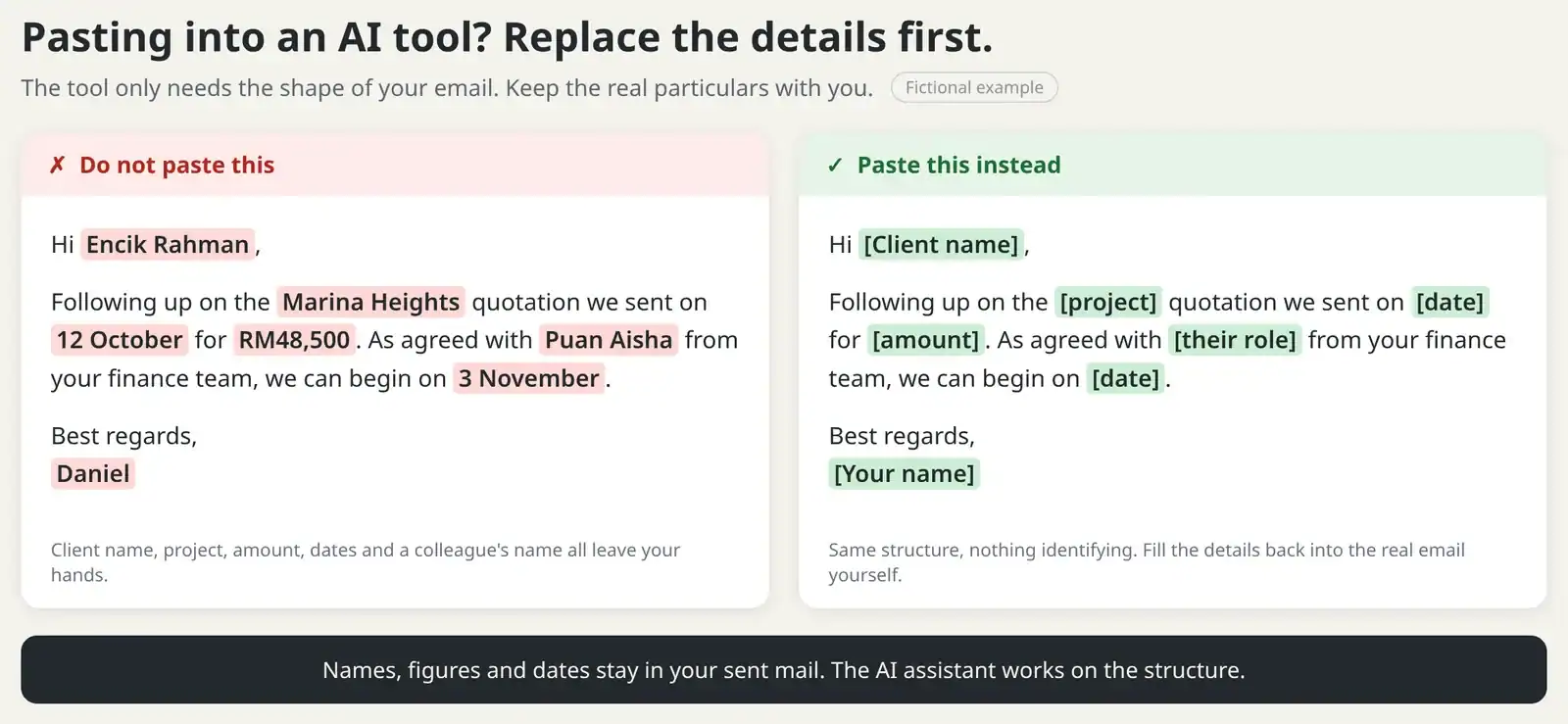
- Pasting client or company data into personal accounts. A proposal draft that includes pricing, names and contract terms does not belong in an unapproved tool. Our guide on using AI at work safely covers what should never go in.
- Sending the first draft. AI drafts read smoothly even when details are wrong. Names, dates, figures and commitments need a human check every time.
- Losing your own voice. Customers notice when every reply suddenly sounds the same. Use AI for structure, then put your phrasing back in.
- Letting AI invent context. If you do not give the background, the tool fills gaps with plausible guesses. A follow-up that references a meeting that never happened damages trust.

A quick check before you press send
Before any AI-assisted email goes out, run this thirty second review:
- Are the names, dates, amounts and references correct against your own records?
- Does the email promise only what you can deliver?
- Does it sound like something you would say in a call with this person?
- Is there anything in it you would not want forwarded, and if so, should it be sent at all?
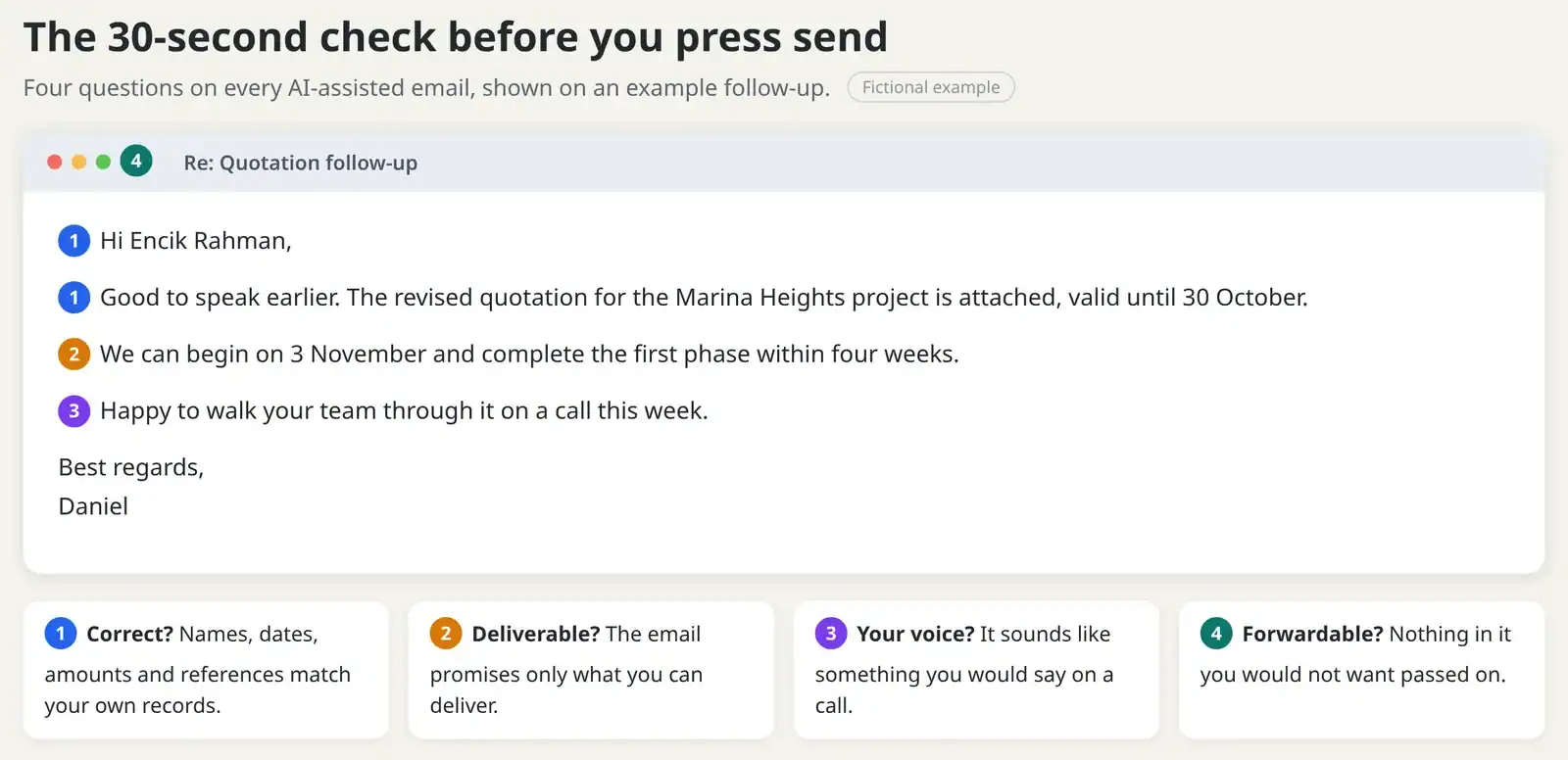
If one answer is no, edit before sending. The goal is not a perfect draft from the tool. The goal is a correct email from you, produced faster.
Proposals and customer follow-ups
Proposals are where AI email writing saves the most time and where the risks are highest. A practical split that works for most teams:
- AI handles: the outline, section headings, a neutral company overview, and a first pass at the executive summary from points you provide.
- You handle: pricing, scope, timelines, terms, and anything specific to the client relationship.
For follow-ups, AI is good at turning your bullet points into a polite nudge. It is not good at knowing whether today is the right day to nudge. Timing and judgment stay with you.
Keeping your team's voice consistent
If several people use AI for customer emails, agree on a short shared guide: how you greet customers, how you sign off, which topics need a manager's review, and what never goes into a prompt. Ten minutes of agreement prevents months of inconsistent replies.
A paid AI plan does not settle any of this on its own. What matters is whether the workspace is approved by your company and whether the team follows the same habits.
What good AI-assisted email looks like
Judge AI email writing by the result, not the tool. An AI-assisted email should be indistinguishable from a well written one: accurate, specific to the reader, appropriate in tone, and free of filler. The strongest teams agree on that standard first, then use AI to reach it quickly instead of spending time crafting the perfect instruction.
A practical check is the proposal standard. Would you send this draft to a client after one careful pass? If not, the habit to build is editing AI output quickly and well, not writing longer instructions. In practice, editing skill is what turns AI from a typing aid into a real time saver.
What AI cannot judge for you
Three decisions should never be delegated. First, whether to send at all: sometimes the right move is a phone call. Second, what to concede: price, deadlines and terms are business decisions. Third, how a specific person will read a specific line: you know the relationship, the tool does not. Teams that keep these three decisions human get the speed benefit without the surprises.
Working in two languages
Most Malaysian teams write in English and Bahasa Melayu, often in the same thread. AI handles both, but quality can differ by language and tool, so test with your own real emails in English and Bahasa Melayu before relying on either. Check nuance and honorifics such as Encik and Puan yourself in every draft. A practical rule is to draft in the language you think in, then ask for a version in the other language and review it yourself. Never send a Malay translation you have not read: small shifts in phrasing can change the level of formality or the meaning of a commitment.
How to tell whether AI is actually saving time
After a month of AI email writing, compare two honest numbers: how long your ten most common emails took before, and how long they take now including editing. If editing eats the saving, the prompts are too vague or the task is a poor fit. The honest test is your own mix: track where the minutes actually come back, whether first drafts, summaries or tone fixes, and drop the uses that do not pay. Measure your own results rather than trusting general claims, including ours.
Frequently asked questions
Will customers know an email was drafted with AI? There is no guarantee they will not notice. What you control is accuracy, voice and accountability: correct details, phrasing that sounds like you, and a sender who stands behind every claim. When those hold, the drafting method matters far less than the quality of the email.
Can AI reply to customers on its own? It can, but for customer relationships we do not recommend it at this stage. A wrong promise sent automatically is still your promise.
Which tool should we use? Start with the AI assistant your company already licenses, for example the one bundled with your office suite, and agree on one shared set of habits before adding more tools.
The bottom line
AI email writing earns its place when the routine parts get faster and the human parts, facts, judgment, tone and promises, get more attention, not less. Start with drafts and tone, keep client data out of unapproved tools, and check every send.
Want your team trained on practical AI email and writing workflows? Mike runs HRDC claimable corporate sessions on AI for workplace productivity across Malaysia.


